The block is designed to simulate a rotary motion lock, which consists of two rotary moving bodies. A locking mechanism is installed on one body (conditionally the case), and grooves for the lock are located on the second body (conditionally the rotor). When the lock passes through the groove, a braking torque is applied.
The relative angular position s in radians is calculated by the formula:
where:
φB and φF – turn angles at the ports "B" and "F", respectively, rad
φfix – angular position of the nearest lock, rad
It is possible to place the locks at an equal distance from each other, or to set their position manually.
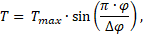
The braking torque can be set either analytically or tabularly. Analytically, the torque T in Nm is calculated by the formula:
where:
Tmax – maximum torque, Nm
Δφ – torque range, rad
If the relative angular position is outside the torque range, then the braking torque is zero (Figure 1).
Figure 1. Dependence of the braking torque on the relative angular position
Inputs
Name
Description
Connection line type
B
Port for connecting a conditionally fixed case
Rotary mechanics
F
Port for connecting a conditionally movable shaft
Rotary mechanics
Outputs
None.
Properties
Name
Parameter
Description
By default
Data type
Position of locks
A group of properties that set the positions of the locks
Method for setting the position of the locks
FiType
Allows you to select the method of setting the position of the locks. The possible values are: "Equal distance", "Manual"
The positions of the locks are in the range of [-pi , pi]. The property is available when selecting the method of setting the position of the locks "Manual"