The block is designed to simulate the contact friction of two rotating surfaces with a variable pressing force.
The relative slip speed ω in rad/s is determined by the formula:
where ωC, ωR – angular speeds at ports "C" and "R", respectively, rad/s
Defining the friction curve is possible in two ways: the Stribeck curve and the tabulated curve.
Stribek curve
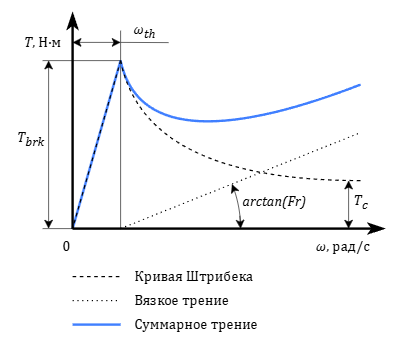
When using this method, the Stribeck friction curve [1] and viscous friction (Figure 1) are used to determine the friction torque.
Figure 1. Dependence of friction torque on relative speed
The friction torque is determined by the formula:
where:
TC and TC – torques applied to ports "C" and "R", respectively, Nm
Tbrk – breakaway friction torque, Nm
Tc – dry (coulomb) friction torque, Nm
ωth – breakaway angular speed, rad/s
C – damp ratio, s/rad
Fr – coefficient of internal friction, Nm·s/rad
Friction torques Tbrk and Tc are calculated depending on the value of the pressing force according to the formulas:
where:
N – pressing force, N
μ – breakaway friction factor
μs – dry (coulomb) friction factor
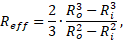
Reff – effective radius of the disk in meters which is set explicitly or calculated by the formula:
where Ro – outer radius of the disk, m; Ri – inner radius of the disk, m
Tabulated curve
Using this method the friction factor is defined by interpolating a given table. If the slip speed exceeds the value specified in the table, extrapolation is not carried out.
The friction torque is determined by the formula:
where μ(|ω|) – friction factor value obtained as a result of interpolation.
Inputs
Name
Description
Connection line type
C
Port for connecting a conditionally fixed case (case)
Rotary mechanics
R
Port for connecting a conditionally moving shaft (rotor)
Rotary mechanics
N
Specified pressing force
Mathematical
Outputs
None.
Properties
Title
Parameter
Description
By default
Data type
Friction curve
A group of properties that define the friction parameters
Friction model
MType
Friction model type The possible values are: "Stribek curve", "Tabulated curve”
Effective disk radius. Changing the property is only possible when choosing the method of disk geometry defining as the "Effective radius", otherwise the property is displayed in the "Read-only" mode and is for reference only