Key-2
 |
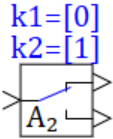 |
| Vectorized | C | |
in the palette |
on the schematic |
The block is vectorized. It implements the function of the managed key according to the algorithm:
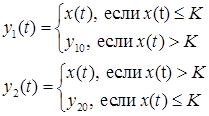
where x(t) is a vector of input signals; y1(t) is a vector of signals at the 1st output port; y2(t) is a vector of signals at the 2nd output port; K1, K2 are vectors of threshold values (setpoints) that determine the conditions for switching signals at the output ports of the block; y10 is a vector of signals at the 1st output port of the block, with input signals that are larger than the threshold values of K1; y20 is a vector of signals at the 2nd output port of the block, with input signals that are smaller than the threshold values of K2.
where x(t) is a vector of input signals; y1(t) is a vector of signals at the 1st output port; y2(t) is a vector of signals at the 2nd output port; K1, K2 are vectors of threshold values (setpoints) that determine the conditions for switching signals at the output ports of the block; y10 is a vector of signals at the 1st output port of the block, with input signals that are larger than the threshold values of K1; y20 is a vector of signals at the 2nd output port of the block, with input signals that are smaller than the threshold values of K2.
Inputs
- input - input signal, x
Outputs
- output1 - the first output port y1;
- output2 - the second output port y2.
Properties
- Setpoint of the first output - vector of threshold values K1;
- Setpoint of the second output - vector of threshold values K2;
- Initial value of the first output - the signal vector y₁₀ at the 1st output port of the block with input signals more than threshold values K1;
- Initial value of the second output - the signal vector y₂₀ at the 2nd output port of the block with input signals less than threshold values K2.
Parameters
- Level - the current position of the key.
Note:
- By default, the block generates a scalar output signal.
- Named properties can be set as local model variables (submodels) in a programming language script, as global project signals using the Tools → Signals main menu item, or as external project signals using an attachable signal database.